A white-labelled payment gateway
Everything in Payment gateway, with one change: the page the shopper pays on is yours. Your domain, your markup, your brand, no ChainOS chrome anywhere — and your merchants see a product that is wholly yours.
Read that page first. Provisioning, branding, the collection pool and the settlement book are identical and are not repeated here. What follows is what changes, and it is almost entirely about security.
What you are giving up
The hosted checkout is served in a cross-origin iframe from a ChainOS-controlled origin. That is not decoration. In crypto the deposit address is the payload and a payment is irreversible, so rendering the address inside your own DOM means any XSS, any compromised tag-manager script and any browser extension with host permissions on your domain can rewrite it silently and take every payment on the page.
The frame does not make that impossible — the honest version of the claim is that it reduces address substitution to a visible impersonation that has to rebuild the UI pixel for pixel, which is categorically harder.
When you render the address yourself, you take that risk back. Not partially: entirely. Everything in the next section exists to replace a control you have removed.
Settlement is decided server-side. The address is bound to the session on our side and fulfilment is decided from the deposit that actually landed, so even a perfect fake of your page steals from the shopper and cannot make a merchant ship. That property is yours whether you host the page or not.
If your reason for white-labelling is brand rather than layout, consider the middle path
first: the hosted page already carries the merchant's logo leading and yours beside it, and
the overlay takes your className and none of our styles. Take the full risk only when the
requirement is genuinely that no ChainOS origin appears anywhere.
1. What ChainOS gives you
When you create a session you get back a complete, authoritative description of what the payer must do. These fields are the contract — render them, do not derive them.
| Field | What it is |
|---|---|
address | Where to pay. Render in full, never truncated |
paymentUri | The chain-specific URI for your QR code, built server-side |
amount | A decimal string in the asset's own units, exactly as it must be paid |
asset, assetContract, decimals | Snapshotted at creation, never re-resolved |
expiresAt | When the checkout stops accepting |
monitorUntil | When the address stops being watched. Weeks later |
serverTime | Our clock, so your countdown does not depend on the payer's device |
confirmations, confirmationsRequired | Progress toward settlement |
status | The same vocabulary we use internally |
reference | The public pay_… id, safe to show |
You build the page, the QR image, the countdown, the copy button and the copy for each terminal state. Nothing else.
2. The six rules that lose money
- Never fulfil on
detected. Only onconfirmed. - Never fulfil from a client callback. Its argument can be synthesised from a console, and no signature fixes it — whatever key the browser holds, an attacker holds too.
- Always compare
amountPaidagainst your own order total, server-side. - Never build the payment URI client-side. EIP-681 carries smallest units and Solana Pay carries decimal ones, and an EIP-681 token URI targets the contract with the recipient as a parameter. Invert that and you send a payer's ETH to the USDT contract.
- Never render an address the client supplied. It comes from the session, server-side.
expiredis not the end. Handleexpired_paidandpayment_late: funds sent to the address are credited untilmonitorUntil.
3. Security requirements for a page you host
These are not best practices. Each one replaces something the frame was doing.
3.1 Put the payment page on its own origin
shop.example.com          your storefront, your analytics, your tag manager
pay.example.com           the payment page. Nothing else lives here
A separate origin means an XSS in the storefront is not an XSS on the page displaying an address, and the browser enforces that rather than your discipline. This is the single highest -value item on the list and it costs a DNS record.
3.2 A strict Content Security Policy, and no exceptions to it
Content-Security-Policy:
  default-src 'none';
  script-src 'self';
  style-src 'self';
  img-src 'self' data:;
  connect-src 'self';
  font-src 'self';
  form-action 'self';
  frame-ancestors 'none';
  base-uri 'none';
  object-src 'none';
  upgrade-insecure-requests
'unsafe-inline' in script-src defeats the entire policy. If your framework needs inline
scripts, use a per-response nonce — never the wildcard.
frame-ancestors 'none' stops your own payment page being framed by somebody else's, which is
the clickjacking half of the same problem. Send X-Frame-Options: DENY alongside it for older
agents.
img-src 'self' data: lets you render a QR code generated in the page from the server-supplied
paymentUri. It does not allow a QR fetched from a third-party image service — which would
hand whoever runs that service the ability to change where the money goes.
3.3 Nothing third-party on this page. Nothing
No tag manager. No analytics. No chat widget. No A/B testing script. No font CDN. No "Powered by" badge that loads from somewhere else.
Every one of those is a script with full DOM access on a page displaying an address, shipped by a party outside your change control, updatable without your knowledge. A single compromised analytics vendor is a total loss of every payment on the page, and it has happened to card gateways repeatedly for the same reason.
If you need conversion metrics, emit them from your server on the events you already receive.
3.4 Pin and vendor your dependencies
- Lockfile committed,
npm ciin the build, no floating ranges. - Everything served from your own origin. Subresource Integrity is for scripts you must load cross-origin, and on this page there should be none.
- The smallest dependency tree you can manage. A QR library and nothing else is achievable.
3.5 Keep the secret key server-side, and know which plane you are on
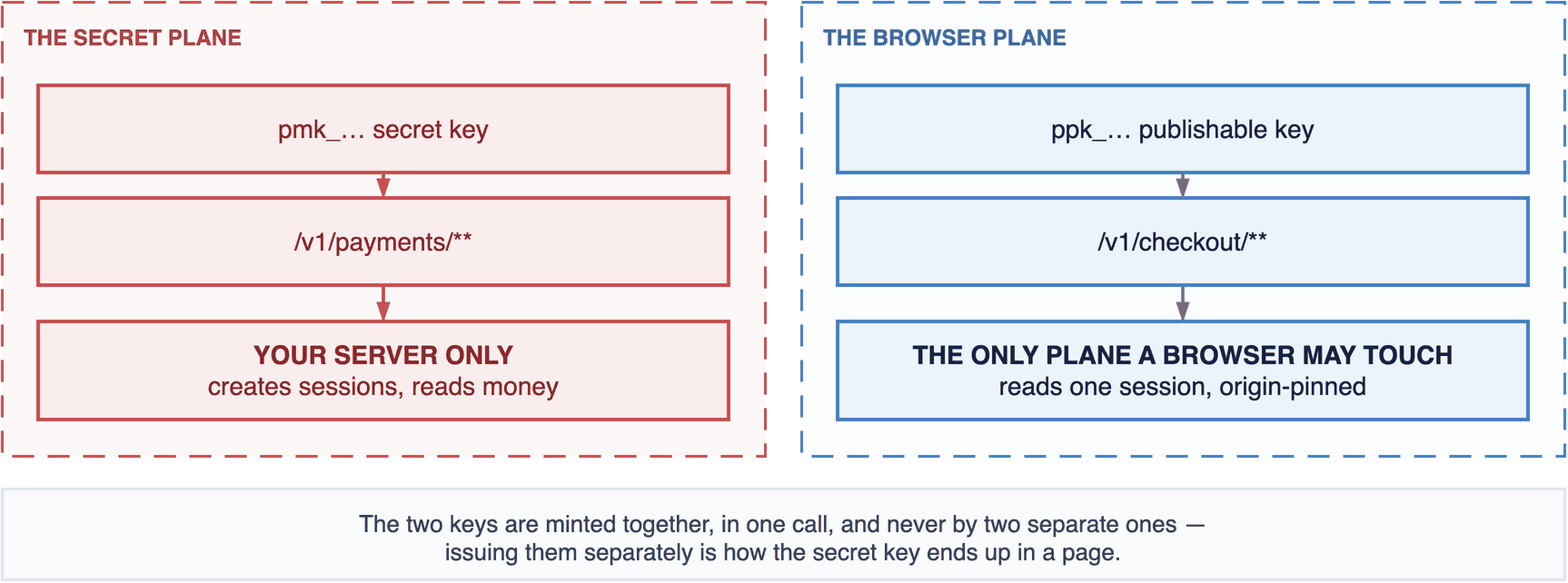
A secret key in a browser is a full payments credential for every merchant you have.
The publishable plane is origin-locked and amount-capped, and both bound the upside only: in
publishable-key mode the browser asserts the amount, so a buyer can request 0.01 against a
100.00 order and the webhook will truthfully report it paid in full. Server-created sessions
are the documented default and are what a gateway should use for every merchant transaction.
3.6 Transport and headers
Strict-Transport-Security: max-age=63072000; includeSubDomains; preload
Referrer-Policy: no-referrer
X-Content-Type-Options: nosniff
Cache-Control: no-store
Permissions-Policy: geolocation=(), camera=(), microphone=(), payment=()
no-store matters: a payment page cached by an intermediary can serve one payer another
payer's address.
3.7 Do not log what you do not need
clientSecret out of access logs, error trackers and analytics payloads. It is not a credential
for your account and it does read the session; a support tool that prints request bodies is the
usual way it escapes.
3.8 Verify the webhook over raw bytes
Covered in code below. Signing over a re-serialised object is the single most common webhook bug in any product, and it fails intermittently, which makes it miserable to debug.
4. The server half
// pay.example.com — server. Creates the session with YOUR amount.
import { randomUUID } from 'node:crypto';

export async function createCheckout(order: Order) {
  const res = await fetch(`${CHAINOS}/v1/payments/sessions`, {
    method: 'POST',
    headers: {
      'X-API-Key': process.env.CHAINOS_SECRET_KEY!,   // pmk_… — never in a browser
      'Content-Type': 'application/json',
      'Idempotency-Key': order.id,                     // a retry must not burn a second address
    },
    body: JSON.stringify({
      chain:  order.chain,
      asset:  order.asset,
      amount: order.total,                             // decimal string, never a float
      reference: order.id,
      merchantId: order.chainosMerchantId,             // the sub-merchant this is for
      expiresInSeconds: 900,
    }),
  });
  const { data } = await res.json();

  await db.query(
    `INSERT INTO checkouts (order_id, merchant_id, chainos_reference,
                            amount_expected, asset, chain, decimals, status)
     VALUES ($1,$2,$3,$4,$5,$6,$7,'created')
     ON CONFLICT (order_id) DO NOTHING`,
    [order.id, order.merchantId, data.reference, order.totalSmallestUnits,
     data.asset, data.chain, data.decimals],
  );

  // Render the page from exactly these. Do not reformat `amount`; do not rebuild the URI.
  return {
    address:     data.address,
    amount:      data.amount,
    asset:       data.asset,
    chain:       data.chain,                 // 'base' — the slug
    chainName:   NETWORK_NAMES[data.chain],  // 'Base' — your own display map
    paymentUri:  data.paymentUri,
    expiresAt:   data.expiresAt,
    serverTime:  data.serverTime,
    reference:   data.reference,
    confirmationsRequired: data.confirmationsRequired,
  };
}
The records to keep
-- Your merchants, joined to ours by the reference YOU chose, never by name.
CREATE TABLE merchants (
    id                  BIGSERIAL PRIMARY KEY,
    name                TEXT NOT NULL,
    chainos_merchant_id UUID UNIQUE NOT NULL,
    external_ref        TEXT UNIQUE NOT NULL
);

-- One row per checkout. This is YOUR idempotency boundary, not ours.
CREATE TABLE checkouts (
    id                BIGSERIAL PRIMARY KEY,
    order_id          TEXT NOT NULL UNIQUE,
    merchant_id       BIGINT NOT NULL REFERENCES merchants(id),
    chainos_reference TEXT NOT NULL UNIQUE,     -- pay_…
    amount_expected   NUMERIC(78,0) NOT NULL,   -- YOUR total, smallest units
    asset             TEXT NOT NULL,
    chain             TEXT NOT NULL,
    decimals          SMALLINT NOT NULL,
    status            TEXT NOT NULL,
    fulfilled_at      TIMESTAMPTZ,              -- set once, ever
    created_at        TIMESTAMPTZ NOT NULL DEFAULT now()
);
chainos_reference … UNIQUE is what lets a redelivered webhook find the row it already wrote.
fulfilled_at set once is what stops you shipping twice.
5. The page half
<!-- Server-rendered. Every value came from the session; none was computed here. -->
<section class="pay" data-expires="{{expiresAt}}" data-server-now="{{serverTime}}">
  <p class="amount">{{amount}} {{asset}}</p>

  <p class="network-warning">
    Send only {{asset}} on {{chainName}}. Anything else is lost.
  </p>

  <!-- In full. The elided middle is where substitution hides, and it is the part
       a careful payer checks against their wallet. -->
  <code class="address">{{address}}</code>
  <button type="button" id="copy">Copy</button>

  <canvas id="qr" data-uri="{{paymentUri}}" aria-label="Payment QR code"></canvas>

  <p id="countdown" aria-live="polite"></p>
  <p id="confirmations"></p>
</section>
// The QR encodes the SERVER's paymentUri verbatim. It is never assembled here.
import QR from './vendor/qr.js';
const canvas = document.getElementById('qr');
QR.toCanvas(canvas, canvas.dataset.uri, { errorCorrectionLevel: 'M' });

// The countdown, which is the one piece of UI that is wrong almost everywhere.
const root   = document.querySelector('.pay');
const expiry = Date.parse(root.dataset.expires);
const skew   = Date.parse(root.dataset.serverNow) - Date.now();   // computed ONCE

function tick() {
  // Recomputed from the wall clock every tick, never decremented: a decrementing
  // counter stops when a mobile tab backgrounds — which is exactly when the payer
  // has switched to their wallet app — and resumes minutes behind.
  const left = expiry - (Date.now() + skew);
  if (left <= 0) {
    // NEVER declare expiry client-side. A fast device clock must not cancel a
    // live payment.
    document.getElementById('countdown').textContent = 'Checking with the network…';
    poll();
    return;
  }
  document.getElementById('countdown').textContent = format(left);
  requestAnimationFrame(() => setTimeout(tick, 1000));
}

// Re-poll when the tab comes back or the network returns.
addEventListener('visibilitychange', () => { if (!document.hidden) poll(); });
addEventListener('online', poll);

async function poll() {
  const r = await fetch(`/api/checkout/${REFERENCE}`);   // YOUR endpoint, your session
  const s = await r.json();
  if (s.status === 'detected' || s.status === 'confirming') stopCountdown();
  render(s);
}

tick();
Stop the countdown the instant a payment is detected. Watching a clock run out on money already sent is a support ticket every time.
6. Fulfilment, exactly once
import express from 'express';
import { createHmac, timingSafeEqual } from 'node:crypto';

const app = express();

// express.raw, NOT express.json — the signature is over exactly what arrived.
app.post('/webhooks/chainos', express.raw({ type: '*/*' }), async (req, res) => {
  const given    = req.header('X-ChainOS-Signature') ?? '';
  const expected = createHmac('sha256', process.env.CHAINOS_WEBHOOK_SECRET!)
    .update(req.body)
    .digest('hex');

  const a = Buffer.from(given), b = Buffer.from(expected);
  if (a.length !== b.length || !timingSafeEqual(a, b)) return res.status(401).end();

  await handle(JSON.parse(req.body.toString('utf8')));
  res.status(204).end();        // 2xx quickly; slow work after, or the ladder fires
});

async function handle(event) {
  if (event.event !== 'payment_confirmed') {
    await recordStatus(event.data.reference, event.data.status);
    return;
  }

  const { rows } = await db.query(
    `SELECT id, order_id, merchant_id, amount_expected
       FROM checkouts WHERE chainos_reference = $1`, [event.data.reference]);
  const c = rows[0];
  if (!c) return;

  if (BigInt(event.data.amountPaidSmallest) < BigInt(c.amount_expected)) {
    await flagUnderpaid(c.id); return;
  }

  const claimed = await db.query(
    `UPDATE checkouts SET fulfilled_at = now(), status = 'confirmed'
      WHERE id = $1 AND fulfilled_at IS NULL RETURNING id`, [c.id]);
  if (claimed.rowCount === 0) return;                  // already handled

  await notifyMerchant(c.merchant_id, c.order_id);     // YOUR webhook to YOUR merchant
}
The last line is the white-label difference. Your merchants integrate against you, so you run a webhook fan-out of your own: your event names, your signature scheme, your retry ladder, your dashboard showing deliveries. ChainOS's webhook reaches you and stops there.
7. Settlement, and why the policy matters more here
The collection pool, the obligations book and the payout recording are exactly as in Payment gateway §4–§7. What changes is that your merchants have no other explanation available.
On the co-branded page, a merchant who asks why has my money not arrived can at least see whose rails they are on. On a white-labelled one, every question about settlement is a question about you. So the policy has to be written down, published to the merchant, and implemented as configuration rather than as a cron job somebody tuned.
Store it per merchant, on your side:
CREATE TABLE settlement_policies (
    merchant_id        BIGINT PRIMARY KEY REFERENCES merchants(id),
    cycle              TEXT   NOT NULL,          -- 'daily' | 'weekly' | 'manual'
    cutoff_utc         TIME   NOT NULL,          -- 23:59:59
    pay_at_utc         TIME   NOT NULL,          -- 09:00:00
    min_payout         NUMERIC(78,0) NOT NULL,   -- per chain+asset; see below
    hold_hours         INT    NOT NULL DEFAULT 0,
    reserve_bps        INT    NOT NULL DEFAULT 0,
    reserve_release_days INT  NOT NULL DEFAULT 0,
    payout_chain       TEXT   NOT NULL,
    payout_asset       TEXT   NOT NULL,
    payout_address     TEXT,                     -- validated, and re-validated on change
    updated_at         TIMESTAMPTZ NOT NULL DEFAULT now()
);
Three rules that are specific to doing this under your own brand:
Publish the cycle and hold to the merchant in words, in their dashboard, next to the balance. "Available 09:00 tomorrow" beside a figure prevents more support tickets than any status page.
Validate payout_address at the moment it is set, against the chain it will be used on,
with POST /v1/addresses/validate — and treat a change to it as a security event needing
re-authentication. An attacker who reaches a merchant's settings and changes one address takes
every future payout, and there is no recall.
Show the fee as its own line. feeBps posts a separate negative entry beside every capture
precisely so a merchant can check it. Netting it into one number makes every dispute a forensic
exercise.
The same worked month
Corner Shop, feeBps: 250, daily above a 5 USDT floor, 2% reserve released after 30 days:
| Day | Entry | Reserve held | Payable |
|---|---|---|---|
| 1 | capture +100.00, fee −2.50, adjustment −2.00 | 2.00 | 95.50 |
| 2 | payout −95.50 | 2.00 | 0.00 |
| 31 | adjustment +2.00 — reserve released | 0.00 | 2.00 |
| 32 | Below the 5.00 floor; rolls forward | 0.00 | 2.00 |
The reserve is an adjustment at capture and an equal, opposite one at release. Do not
implement it by paying out less than the book says you owe — then the book says you owe
nothing and you do.
8. Before you go live
| Payment page on its own origin, no other application on it | ☐ |
CSP with no 'unsafe-inline', frame-ancestors 'none', verified with a report-only run first | ☐ |
| Zero third-party scripts on the payment page, checked in CI | ☐ |
| Lockfile committed; build fails on an unpinned dependency | ☐ |
pmk_… unreachable from any browser bundle, checked in CI | ☐ |
Webhook verified over raw bytes, with timingSafeEqual | ☐ |
| The same delivery sent twice ships exactly one order | ☐ |
| Address rendered in full everywhere it appears, including emails | ☐ |
| Countdown recomputed from the wall clock, never declaring expiry itself | ☐ |
payment_late and payment_wrong_asset have a defined handler, not a default branch | ☐ |
| Merchant payout address changes require re-authentication | ☐ |
| Settlement policy published to merchants in words | ☐ |
Attribution
Our hosted page carries a small "Powered by ChainOS" mark. On a page you build and host yourself there is no such requirement, and nothing in the API asks for one.
Next
- Build your own checkout — the reference page this expands on.
- Payment gateway — provisioning, the pool and the book in full.
- Verifying payments — read it before you write fulfilment code.