Accepting crypto as a merchant
You sell things. You want to take stablecoins without an intermediary holding the money, and you are willing to run one container to get that.
This is the strongest position available in the product: the payment addresses derive from your mnemonic, the funds land where only you can spend them, and neither Ziklag nor anybody who compromises Ziklag can move them. A payment processor cannot offer you that, because the money passes through their balance sheet on the way to yours.
Then you are somebody else's sub-merchant, and the page you want is Payment gateway — read it from the merchant's side. The trade is real and worth stating: no infrastructure, and your money lands in their treasury and becomes a book entry they owe you.
What you will have at the end
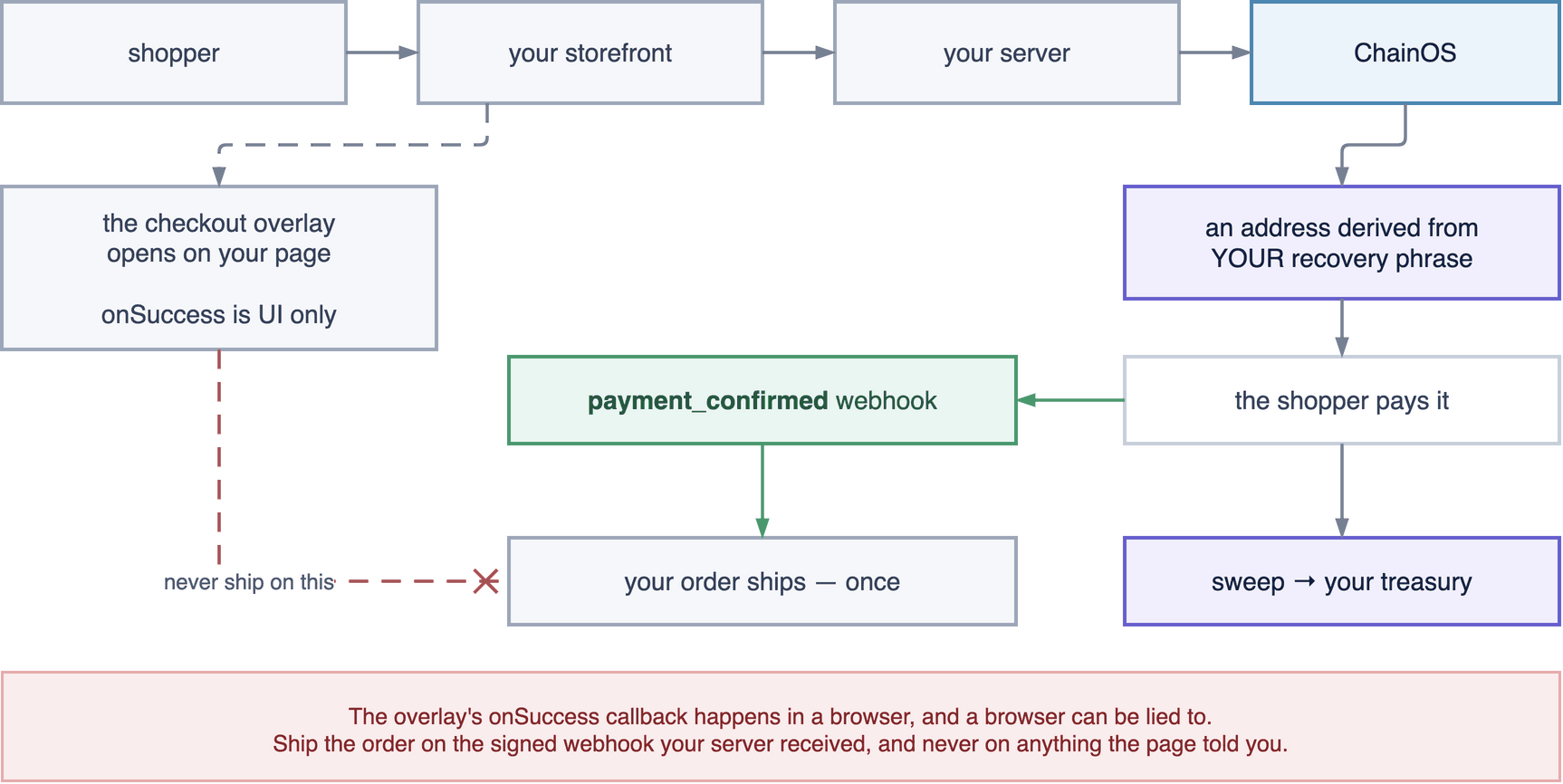
Seven chains are available for checkout: Bitcoin, Ethereum, BNB Smart Chain, Polygon, Avalanche, Base and TRON. Solana, Stellar and XRP are refused at session creation with the reason — they are not an oversight, and Payments overview explains each one.
1. Set up
Three things, and the first two are the same as any ChainOS account.
Create the organization and run the Edge. Follow steps 1 and 2 of Customer wallets. Back the mnemonic up before you take a payment, because it is the only thing that can spend your takings.
Mint a payment key pair. Two keys, minted together and never by two separate calls — issuing them separately is how the secret one ends up in a page.
curl -X POST $CHAINOS/v1/payments/keys \
  -H "X-API-Key: $CHAINOS_KEY" -H "Content-Type: application/json" \
  -d '{
    "label": "storefront",
    "origins": ["https://shop.example.com"],
    "maxAmount": "500000000"
  }'
| Key | Lives | May do |
|---|---|---|
pmk_live_… — secret | Your server, in your secret manager | Everything on the payments API |
ppk_live_… — publishable | Your page source | Open a checkout session, and nothing else |
origins is an exact string list, port included. It drives both the frame-ancestors policy
the checkout is served with and the Origin the publishable key is accepted from. Origins are
compared whole and never by suffix, so https://evil-example.com does not match
https://example.com.
Register the webhook, before anything else. Whatever is in your quickstart is what reaches
production. POST /v1/webhooks returns the signing secret exactly once.
2. Ask which chains you may offer
Do not hardcode the list.
curl -s $CHAINOS/v1/payments/readiness -H "X-API-Key: $CHAINOS_PAYMENT_SECRET"
Every chain comes back with available, a reason when it is not, the assets you may price
in, the confirmation threshold, and — the field that saves you money — nativeMinimum and
estimatedSweepFee.
A payment below the chain's economic minimum is refused at creation, with a message naming a cheaper chain:
5 USDT is below the 40 USDT minimum for Ethereum at current gas. Use Base, BSC or Polygon.
That is the only moment this is free to fix. A 5 USDT payment on Ethereum costs more in gas to collect than it is worth, and batching does not help — on an account-model chain every consolidation is its own transaction. Steer the chain choice on the product page, not after the shopper has committed.
For a general storefront, offering Base, Polygon and BSC for stablecoins and TRON for USDT covers most of the volume at fees that do not eat the margin on a small basket.
3. Create the session on your server
Always on your server, with your amount. The alternative is explained in step 7 and you almost certainly do not want it.
// server/checkout.ts
export async function startCryptoCheckout(order: Order) {
  const res = await fetch(`${CHAINOS}/v1/payments/sessions`, {
    method: 'POST',
    headers: {
      'X-API-Key': process.env.CHAINOS_PAYMENT_SECRET!,   // pmk_live_… — server only
      'Content-Type': 'application/json',
      // Derivation burns an index on your extended public key that is never
      // reused. A retried POST without this costs you an address you cannot
      // get back.
      'Idempotency-Key': `order-${order.id}`,
    },
    body: JSON.stringify({
      chain:  order.chain,            // 'base'
      asset:  order.asset,            // 'USDC'
      amount: order.total,            // a STRING: "49.99". Never a float
      reference: order.id,            // echoed on every event
      description: `Order ${order.id}`,
      customerEmail: order.email,
      expiresInSeconds: 900,
      successUrl: `https://shop.example.com/orders/${order.id}/thanks`,
      cancelUrl:  `https://shop.example.com/cart`,
    }),
  });

  const { data: session } = await res.json();

  await db.query(
    `INSERT INTO crypto_checkouts
       (order_id, chainos_reference, amount_expected, asset, chain, decimals, status)
     VALUES ($1,$2,$3,$4,$5,$6,'created')
     ON CONFLICT (order_id) DO NOTHING`,
    [order.id, session.reference, order.totalSmallestUnits,
     session.asset, session.chain, session.decimals],
  );

  // clientSecret is shown once, on this response and no other.
  return { reference: session.reference, clientSecret: session.clientSecret };
}
Two fields of the response deserve attention before you build the page.
warnings carries non-fatal conditions you should see. no_sweep_policy means you are taking
payments to addresses nothing will ever consolidate — fine on day one, expensive by month
three. Step 8 fixes it.
monitorUntil is weeks after expiresAt. Those are two different deadlines and conflating
them loses money; see step 6.
4. Open the checkout
The payment UI runs in a cross-origin iframe served from ChainOS. The shopper never leaves your site.
React
npm install @ziklag/chainos-react
import { CryptoPayment } from '@ziklag/chainos-react';

export function PayWithCrypto({ session, orderId }) {
  return (
    <CryptoPayment
      reference={session.reference}
      clientSecret={session.clientSecret}
      host="https://pay.your-company.example"
      className="btn btn-primary"          // your styles, none of ours
      onSuccess={() => router.push(`/orders/${orderId}/thanks`)}
      onDismiss={(reason) => track('checkout_dismissed', { reason })}
    >
      Pay with crypto
    </CryptoPayment>
  );
}
Any other stack
npm install @ziklag/chainos-js
<button id="pay-crypto">Pay with crypto</button>

<script type="module">
  import * as ChainOSPay from '@ziklag/chainos-js';

  const res = await fetch('/api/checkout/crypto', { method: 'POST' });
  const session = await res.json();          // { reference, clientSecret }

  document.querySelector('#pay-crypto').addEventListener('click', () => {
    ChainOSPay.open({
      reference: session.reference,
      clientSecret: session.clientSecret,
      host: 'https://pay.your-company.example',
      onSuccess: () => { window.location = '/orders/thanks'; },
    });
  });
</script>
If your storefront is a PHP or Rails monolith, the server half is an ordinary HTTP call and
the browser half is the script tag above — @ziklag/chainos-js is also published for a
<script src> include, where it is available as ChainOSPay.
host is not optional in practiceEvery ChainOS deployment is a separate organization running its own Edge, so there is no single CDN origin that is correct for everyone. Getting it wrong produces a checkout that cannot reach your API — not one that silently pays somebody else.
If your site sends a Content Security Policy, allow the checkout origin as a frame source:
frame-src https://pay.your-company.example;
Nothing else is needed. The checkout sets no cookies and touches no storage.
5. Ship the order, exactly once
onSuccess runs in your own JavaScript and its argument can be typed into a console. The
package's type says so — PaymentSucceededHint carries readonly unverified: true, so the
warning appears in your editor at the call site rather than in a page you read once.
The signed webhook is the order book. The callback is the user interface.
import express from 'express';
import { createHmac, timingSafeEqual } from 'node:crypto';

const app = express();

// express.raw, NOT express.json. The signature is over exactly what arrived —
// re-serialising JSON changes key order and whitespace and the HMAC will not match.
app.post('/webhooks/chainos', express.raw({ type: '*/*' }), async (req, res) => {
  const given = req.header('X-ChainOS-Signature') ?? '';
  const expected = createHmac('sha256', process.env.CHAINOS_WEBHOOK_SECRET!)
    .update(req.body)
    .digest('hex');

  const a = Buffer.from(given), b = Buffer.from(expected);
  if (a.length !== b.length || !timingSafeEqual(a, b)) return res.status(401).end();

  await handle(JSON.parse(req.body.toString('utf8')));
  res.status(204).end();          // 2xx fast; do slow work after
});

async function handle(event) {
  if (event.event !== 'payment_confirmed') {
    await recordStatus(event.data.reference, event.data.status);
    return;
  }

  const { rows } = await db.query(
    `SELECT id, order_id, amount_expected, fulfilled_at
       FROM crypto_checkouts WHERE chainos_reference = $1`,
    [event.data.reference],
  );
  const checkout = rows[0];
  if (!checkout) return;                      // not ours; ignore rather than guess

  // Compare against YOUR total. Yours is the only place the real total exists.
  if (BigInt(event.data.amountPaidSmallest) < BigInt(checkout.amount_expected)) {
    await flagUnderpaid(checkout.order_id);
    return;
  }

  // The WHERE clause is what makes a redelivered webhook a no-op instead of a
  // second shipment. Delivery is at-least-once by contract.
  const claimed = await db.query(
    `UPDATE crypto_checkouts SET fulfilled_at = now(), status = 'confirmed'
      WHERE id = $1 AND fulfilled_at IS NULL RETURNING id`,
    [checkout.id],
  );
  if (claimed.rowCount === 0) return;

  await shipOrder(checkout.order_id);
}
Four rules, and each of them costs money when broken:
- Fulfil on
payment_confirmed, never onpayment_detected. A detected payment can still be reorganised out of existence. - Never fulfil from a client callback. No signature fixes this — whatever key the browser holds, an attacker holds too.
- Always compare
amountPaidagainst your own total, server-side. - Set
fulfilled_atonce. A retry ladder that fulfils on every delivery ships goods on every delivery.
6. The events you will actually see
| Event | What it means | What to do |
|---|---|---|
payment_created | A checkout started | Nothing, usually |
payment_detected | On chain, unconfirmed | Show received, confirming |
payment_confirmed | Settled | Ship |
payment_completed | Invoiced and closed | Attach the invoice number |
payment_underpaid | Less arrived than asked | Ask for the remainder, or part-fulfil |
payment_overpaid | More arrived | The surplus is the payer's. Refund it |
payment_expired | The countdown ran out unpaid | Release the stock |
payment_late | Paid after expiry | Real money. Fulfil, or refund deliberately |
payment_wrong_asset | They sent something else | Real money, not credit. Decide by hand |
payment_cancelled | Merchant or payer closed it | Still monitored |
expired is not the end, and this is where merchants lose customersexpiresAt stops the checkout accepting the payment. monitorUntil — weeks later — is when
the address stops being watched. A shopper who broadcast at 14:59:50 against a 15:00:00
deadline has sent real money and it is credited.
Handle payment_late explicitly. The default behaviour of most integrations — "expired, order
cancelled" — means you keep the funds and the shopper gets nothing, which is the worst
possible outcome for both of you.
payment_wrong_asset is its own event for the same reason. A payer who sends USDC to an
address quoted in USDT has sent real money; it is swept like any other balance, and settling
the order against an asset you never agreed to price would be worse than leaving it
unattributed. Decide it by hand.
7. Publishable-key mode, and when it is right
For a fixed-price digital item, a tip jar or a donate button you can skip the server round trip entirely:
<CryptoPayment publishableKey="ppk_live_…" chain="base" asset="USDC" amount="5.00" />
A shopper can pay 0.01 for a 100.00 item and the webhook will faithfully report a confirmed
payment carrying amountWasClientAsserted: true. Origin locking and maxAmount bound the
upside only.
Use it where the amount genuinely is the payer's to choose. For a cart total, create the session on your server.
8. Getting the takings into one wallet
Every checkout derives a fresh address. After a hundred orders you have a hundred addresses holding a hundred small balances, and on an account-model chain you cannot spend them together.
So configure a treasury wallet and a sweep policy for each (chain, asset) you accept — exactly
as in Customer wallets step 8. The no_sweep_policy warning on the
session response exists to remind you.
Sweeps are never billed, so sweep as often as the network fee justifies. ChainOS is not the cost you are optimising against.
9. Refunds
There is no chargeback, no issuer and no recall. A refund is a new outbound payment that you choose to make: an ordinary withdrawal from an address you control to the address the payer sent from.
curl -X POST $EDGE/transactions \
  -H "X-API-Key: $CHAINOS_EDGE_KEY" \
  -H "Idempotency-Key: refund-order-4418" \
  -H "Content-Type: application/json" \
  -d '{ "chain": "base", "from": "<a funded address you control>",
        "to": "<the counterparty from the deposit event>",
        "amount": "49990000", "tokenContract": "0x833…" }'
Two cautions. The counterparty on a deposit event is the address that sent the funds, which
for an exchange withdrawal is the exchange's hot wallet, not your customer — refunding
there may credit nobody. Ask the payer for a refund address rather than inferring one.
And the sending address pays its own network fee, always. An address holding only USDC cannot send USDC. See Withdrawals.
10. Test it before it is real
POST /v1/sandbox/simulate-deposit drives a session to confirmed with no chain call, so the
whole path above is exercisable with a flk_test_ key.
The one test worth insisting on: send the same webhook delivery twice. If the second one
ships a second order, the fulfilled_at guard is not where you think it is. Then simulate an
underpayment and a late payment, because those two are what your support team will actually
receive.
Next
- Verifying payments — the shortest page in the documentation and the only one that can cost you money.
- Payment button — every prop, wallet connection, and what the payer sees.
- Payment testing — the sandbox surface.