Identity rotation
The most consequential alert this product produces. Read this page before you ever have to act on one.
What it means
The Edge signs every request to Cloud with an Ed25519 key derived from your mnemonic at
m/83696968'/0'/0'. Cloud pins the public half on first sync.
If the identity Cloud sees stops matching the one it pinned, a different mnemonic is mounted. There is no other explanation. The identity is derived, not configured, so it cannot change while the seed stays the same.
Cloud's response is immediate and deliberate:
- Authentication fails before the payload is read —
401 EDGE_SIGNATURE_INVALID. - Any new extended public keys are quarantined, not registered.
- The affected chains go amber (
quarantined); address generation is blocked. identity_rotation_detectedis delivered as a webhook, regardless of your subscription filter.- Your account owner is paged by email.
- Further operations return
409 IDENTITY_ROTATION_PENDING.
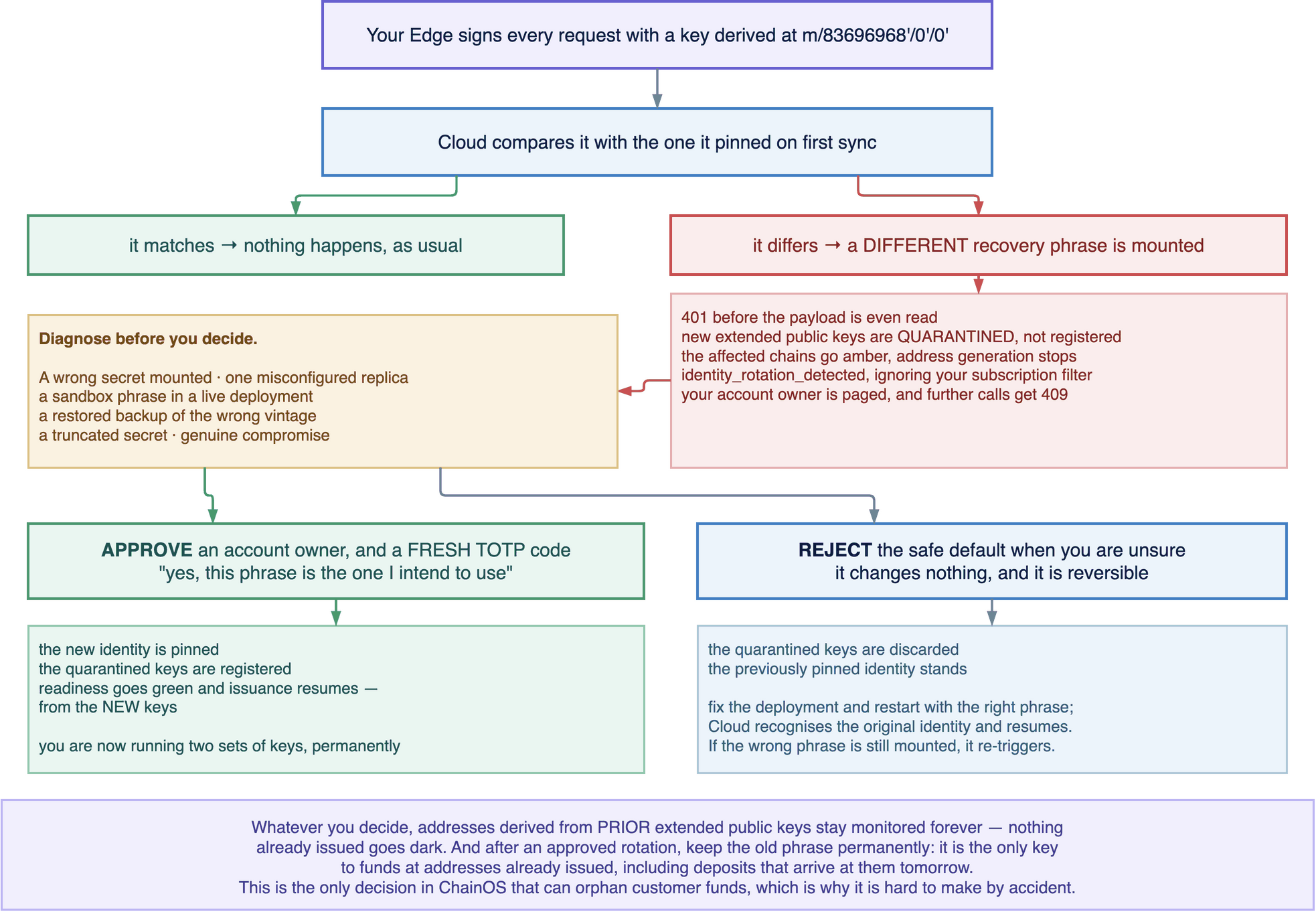
Why the gate exists
Addresses derive from the mnemonic. A different mnemonic derives different addresses.
If Cloud accepted the new identity silently, it would begin issuing addresses from the new keys to your existing customers — while deposits kept arriving at the old addresses, whose private keys your new Edge does not hold. Those funds would still be recoverable with the old phrase, and nobody would know they needed it until a customer complained.
This is the only decision in ChainOS that can orphan customer funds. That is why it requires an account owner and a fresh TOTP code rather than being a setting.
One thing it explicitly does not do: stop watching what you already have. Addresses derived from prior extended public keys stay monitored forever. Nothing already issued goes dark, whatever you decide.
Diagnose before you decide
Approving means "yes, this new mnemonic is the one I intend to use". If it is not — if a wrong secret got mounted — approving tells ChainOS to derive future addresses from a phrase you may not have a backup of.
Find the cause first. Every hour you spend diagnosing is an hour of blocked address generation, which is annoying. Approving the wrong phrase is permanent.
Did you intend to change the mnemonic?
If someone on your team deliberately rotated, and you have the new phrase backed up and tested, this is expected and you can proceed to approval.
If not, work through these
| Cause | How to check |
|---|---|
| A wrong secret mounted | Compare the mounted file against your secret manager. A stale Kubernetes secret in one namespace, or a Compose file pointing at the wrong path |
| A replica with a different mnemonic | GET /v1/edge/sessions — look at podHint. In a fleet, one misconfigured replica does this while the others are fine |
| A sandbox phrase in a live deployment | Check the API key prefix on that Edge. Also produces 409 CROSS_ENVIRONMENT_IDENTITY |
| A restored backup of the wrong vintage | An older secret-manager version containing a superseded phrase |
| A truncated or re-encoded secret | A 0400 file with a trailing newline, or a base64 round-trip. The Edge validates the BIP-39 checksum, so this usually fails earlier — but a valid different phrase does not |
| Genuine compromise | Nobody can account for the change. Treat as an incident |
Confirm which phrase is mounted by checking what it derives. Do this in sandbox, not against live:
# Start a sandbox Edge with the suspect phrase and compare index 0.
curl -s "$EDGE/addresses?chain=btc&size=1" -H "X-API-Key: $CHAINOS_EDGE_KEY" \
  | jq -r '.data.content[0] | [.derivationPath, .address] | @tsv'
Against your own record of the first address your live account issued. If they differ, the mounted phrase is not your live one.
Approving
Requires an account owner and a fresh TOTP code.
Console: Settings → Security → Pending rotations → Approve.
curl -X POST $CLOUD/v1/settings/rotations/{id}/approve \
  -H "Authorization: Bearer $TOKEN" \
  -H "Content-Type: application/json" \
  -d '{ "totp": "123456" }'
What happens:
- The new identity is pinned.
- The quarantined extended public keys are registered.
- Readiness returns to green and address generation resumes — from the new keys.
- Addresses from the previous keys stay monitored.
Rejecting
curl -X POST $CLOUD/v1/settings/rotations/{id}/reject \
  -H "Authorization: Bearer $TOKEN" \
  -d '{ "totp": "123456" }'
The quarantined keys are discarded and the previously pinned identity stands. Reject when the change was a mistake, then fix the deployment and restart the Edge with the correct phrase — Cloud will recognise the original identity and resume normally.
Rejecting is the safe default when you are unsure. It changes nothing and it is reversible; the rotation simply re-triggers on the next sync if the wrong phrase is still mounted.
After an approved rotation
Keep the old mnemonic. Permanently. It is the only key to funds at addresses already issued, including deposits that arrive at those addresses after the rotation. You are now running two sets of keys and that is not a temporary state — see Mnemonic management.
Then:
- Sweep funds from old addresses into treasury using the old phrase, if you want to stop maintaining two key sets in practice. Note that new deposits to old addresses will keep arriving from customers who saved the address.
- Decide whether to re-issue addresses. You do not have to. Old addresses keep working and stay monitored. Re-issuing means telling customers their deposit address changed, which is a support cost.
- Export the address inventory so the old-key addresses are recorded outside ChainOS:
curl -s "$EDGE/addresses?size=1000" -H "X-API-Key: $CHAINOS_EDGE_KEY" \| jq -r '.data.content[] | [.chain, .address, .derivationPath, .userRef] | @csv' \> addresses-pre-rotation.csv
- Record the reason in your own change log. A rotation with no recorded cause is the thing an auditor will ask about.
If you suspect compromise
Treat as a security incident, not as a configuration problem.
- Reject the rotation. Do not approve an identity you cannot account for.
- Do not restart the Edge in a loop. Repeated authentication failures are noise on top of a signal you need.
- Revoke the Edge's API key — Settings → API keys — which cuts that Edge off from Cloud regardless of what it holds.
- Revoke the
zkl_*local keys your application holds if the host itself is suspect. - Assume the old mnemonic is compromised if the host was. Move funds using it, from a machine you trust, to addresses derived from a phrase generated fresh.
- Mail
security@ziklagconsulting.comwith the rotation id and themeta.requestIdof a failing request.
Ziklag cannot move your funds on your behalf in any of these steps, including this one. That is the property that makes a Cloud-side compromise survivable and it is also the reason step 5 is yours to carry out.